

The version number tells you which nopCommerce release is installed.1 It does not tell you everything the store has learned to do since installation.
A customized system may contain specialist plugins, altered templates, external integrations and business rules that staff now regard as ordinary features. Those details determine much of the upgrade work.
Consider a hypothetical store planning a move from nopCommerce 4.2 to 4.9.2 This is an upgrade-planning example, not a claim that a particular client’s upgrade has been completed.
Before estimating the move, I would build an inventory of the current behavior and the changes responsible for it. Otherwise, the project can become a very thorough way to discover requirements during testing.
Identify what needs to arrive in the new version
Start with the codebase and the people using the system. Each can reveal something the other does not make obvious.
The inventory should include:
- Installed plugins and their available target-version support.
- Direct changes to platform code.
- Theme overrides and custom administration screens.
- Payment, shipping, accounting and other integrations.
- Scheduled jobs, imports, exports and generated documents.
- Database additions and migration requirements.
- Hosting, runtime and dependency requirements.
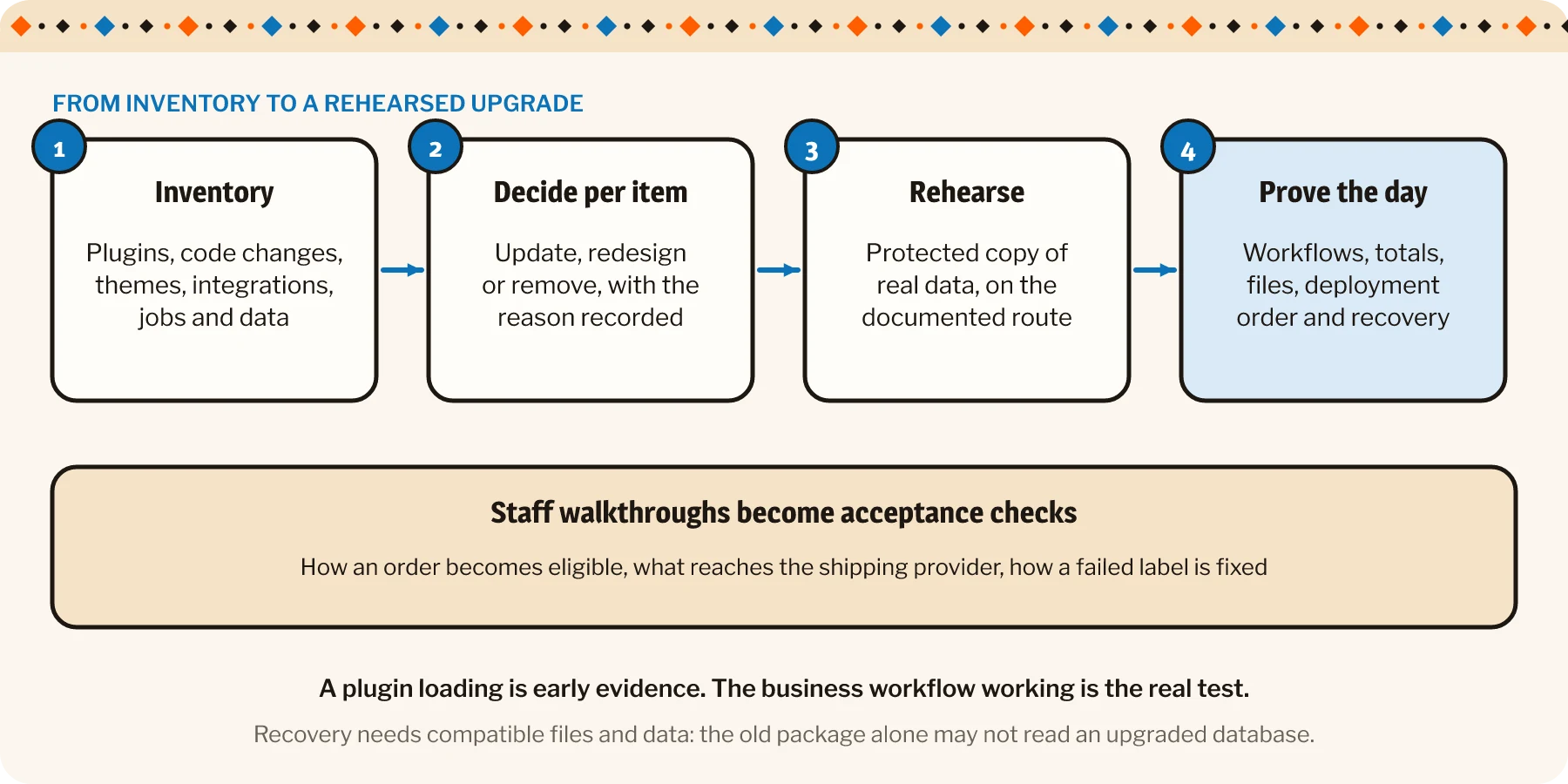
Record why each customization exists. A feature may still be essential, may now be covered by the target platform or may no longer be used. That distinction can prevent the team from carefully migrating a workaround whose original problem retired two years ago.
Compare behavior as well as files
Source differences help locate changes. Staff walkthroughs help explain their purpose and the exceptions that matter.
Take a custom shipping workflow. Identify how an order becomes eligible, which information reaches the provider and what staff do if a label cannot be created. Capture how they retrieve an existing label and correct a mistake.
Those behaviors become meaningful acceptance checks on the upgraded system. A plugin loading successfully is only an early part of the evidence.
For third-party packages, check compatibility and the applicable license for the chosen versions. An existing installation does not establish that the same technical or commercial assumptions apply to the target arrangement.
As nopCommerce Silver Partners, we’ve put this into practice. See the nopCommerce store we built for Freddy’s Jewelry.
Choose how each customization should move
A supported plugin update may provide a suitable path. A direct platform modification may need redesign through a cleaner extension point. A redundant customization may be removed after its replacement behavior is confirmed.
| Possible path | Before you commit | |
|---|---|---|
| Plugin with target-version support | A supported plugin update | Check compatibility and the licence for the chosen versions |
| Direct change to platform code | Redesign through a cleaner extension point | Agree the behavior to keep with the staff who rely on it |
| Customization the platform now covers | Remove it | Confirm the replacement behavior first |
Keep those decisions explicit. They affect scope, risk and the amount of business review required.
The goal is to preserve useful behavior while giving the upgraded application a maintainable structure. Copying every old change into a new codebase can preserve the maintenance problem with impressive loyalty.
Rehearse the data move and the operating day
nopCommerce’s upgrade guidance is version-dependent. Older releases can require sequential SQL scripts, while newer paths use application migrations. Establish the documented route for the exact starting and target versions, including custom database changes.
Use a protected copy of representative data in an isolated environment. Prevent test activity from reaching live customers or external services unintentionally.
Check out this blog: The checkout is only the beginning of a nopCommerce project.
Run the important workflows after migration: normal transactions, exceptions, staff actions and background processing. Check relevant data totals, relationships and files rather than relying solely on whether the application starts.
A rehearsal should also establish the deployment sequence and likely interruption. Identify which services pause, what changes are allowed during the move and how work resumes afterward.
The recovery plan needs compatible application files and data. If the upgraded database cannot be used by the previous application, returning to the old package alone will not restore the service. Account for activity that could occur after the recovery point.
Then connect the technical plan to the business reason for the work: supported dependencies, a required capability or a more sustainable maintenance position.
A useful inventory turns a vague upgrade into a set of decisions the team can assess. There may still be surprises. At least they will have fewer places to hide behind something called “final-custom-fix.”