

Bulk label printing rarely gets the glamorous slide in a website presentation.
The homepage has beautiful photography. The back office has a small gray button that somebody presses a hundred times before lunch. That button may deserve a better agent.
For a custom commerce system built around nopCommerce, the administration experience is part of the product.1 Useful batch actions, clear exceptions and appropriate permissions can make recurring work easier to manage.
The place to begin is a real staff task, with the proposed changes clearly distinguished from features already available. Here is a walkthrough using a hypothetical dispatch workflow.
Follow one batch from selection to completion
The operator needs to identify eligible orders, prepare their labels and know which items require attention. That complete journey should guide the screen.
Make selection explicit before adding a bulk action
A filtered order list might show records ready for dispatch. The operator selects several and chooses the appropriate action.
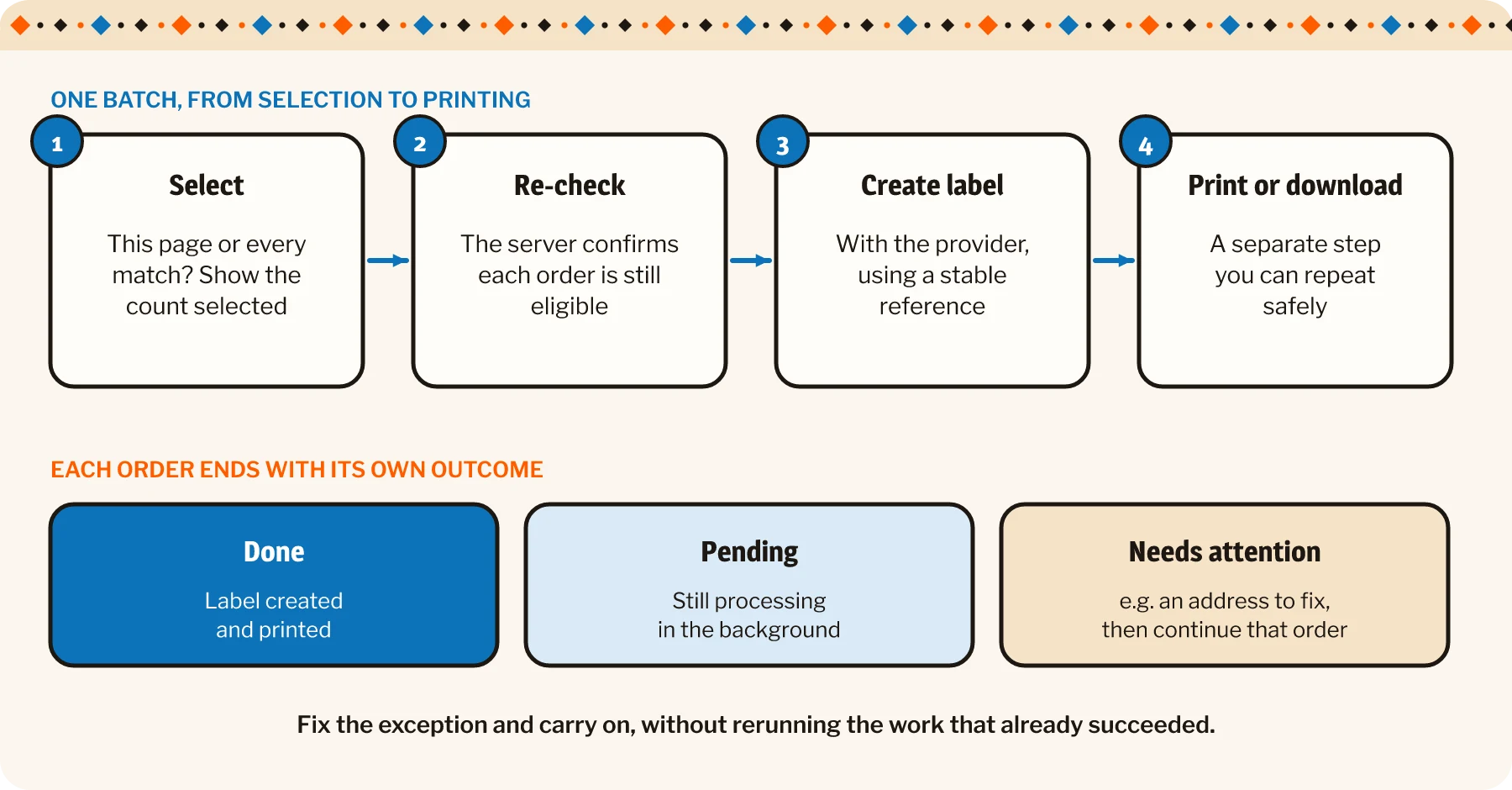
Clarify whether “select all” means the visible page or every matching record. Show the number selected and give people a way to inspect the set before a consequential action begins.
Eligibility also needs a business definition. An unpaid order, an incomplete address and an order already dispatched may require different treatment. Explain why a record is unavailable for the action rather than leaving staff to interpret an unexplained disabled checkbox.
The server should check eligibility again when processing starts. A record can change after the list was loaded, especially when several staff members are working together.
Separate creating a label from printing it
A shipping integration may create a label through an external provider. Printing or downloading that existing label is a separate operation.
That distinction matters when a browser closes or the printer jams. Staff should be able to retrieve an already-created label without unintentionally purchasing another one.
Use stable references for the order, provider request and resulting label. Where the provider supports idempotent operations, use that mechanism appropriately. A repeated click should resolve to the intended work, with uncertain provider outcomes checked before a new request is made.
Label voiding, replacement and reprinting may have different rules. The interface should make those actions clear instead of gathering them beneath a friendly but mysterious “Try again.”
As nopCommerce Silver Partners, we’ve put this into practice. See the nopCommerce store we built for Freddy’s Jewelry.
Let partial success remain understandable
A batch can finish with several labels created and one address requiring correction. That should appear as a clear result for each relevant order.
A single “failed” banner can leave staff wondering whether to repeat everything. A single “complete” banner can hide the one parcel that is still waiting.
Show what succeeded, what remains pending and what needs intervention. Let the operator correct an exception and continue the appropriate item without rerunning the completed work.
For larger batches, background processing may provide a better experience than keeping the browser request open. The batch needs a durable identity and a progress view that remains useful if the operator returns later.
Make the workflow comfortable for a team
The next design questions concern access, accountability and the people who pick up the work after someone else has started it.
Match permissions to consequential actions
Viewing orders, creating labels, canceling dispatch and issuing refunds are different responsibilities. The application should enforce the appropriate permissions for each.
Avoid using a broad administrator role as the only route to a useful staff feature. The interface can show sensible options while the server independently checks authorization.
A short confirmation may be appropriate for an action with substantial consequences. Requiring the same ceremony for every harmless repeat action can make the important confirmations easier to overlook.
Pairs well with One business, several storefronts, and a surprisingly complicated back office.
Leave a useful operational history
Record who initiated the batch, which orders it included and what happened to each item. Include the relevant external references and timestamps.
The history should help a colleague answer a practical question: has this parcel’s label already been created, replaced or voided? It should not require them to decipher an enormous technical log.
Keep routine status information readable and make deeper diagnostics available to the support team where needed. Different people need different levels of detail.
Before release, ask an intended operator to complete a representative batch, resolve an invalid address, recover from a closed browser and reprint an existing label. Observe where they hesitate and whether the resulting records match their understanding.
Then test concurrent work and the relevant external-service failures. The pleasant path is important; the interruption is where the design shows whether it understands the job.
A good back office should let staff make progress without keeping a separate mental register of everything the screen forgot to explain. It may never headline the launch announcement. The people using it every day will notice.