

Laravel AI SDK v1.0 arrived on September 23, 2026.1 The release moves the project beyond the beta introduced in February and adds useful controls around AI-assisted application workflows.
For a business running Laravel, I would look particularly closely at tool approvals, conversation state and the upgrade implications for an existing integration.2
Those features address real application concerns. They still need a clear job to do inside the business.
Consider a hypothetical support assistant that gathers relevant information, drafts a reply and proposes closing a ticket. Finding information and changing a ticket’s status have different consequences. The application should treat them accordingly.
Put the agent inside a defined business function
The SDK provides a Laravel-native interface across providers. The application needs to define its own contract for the feature: what information it may access, which actions it may propose and what a completed task means.
Preserve the boundary around each tool
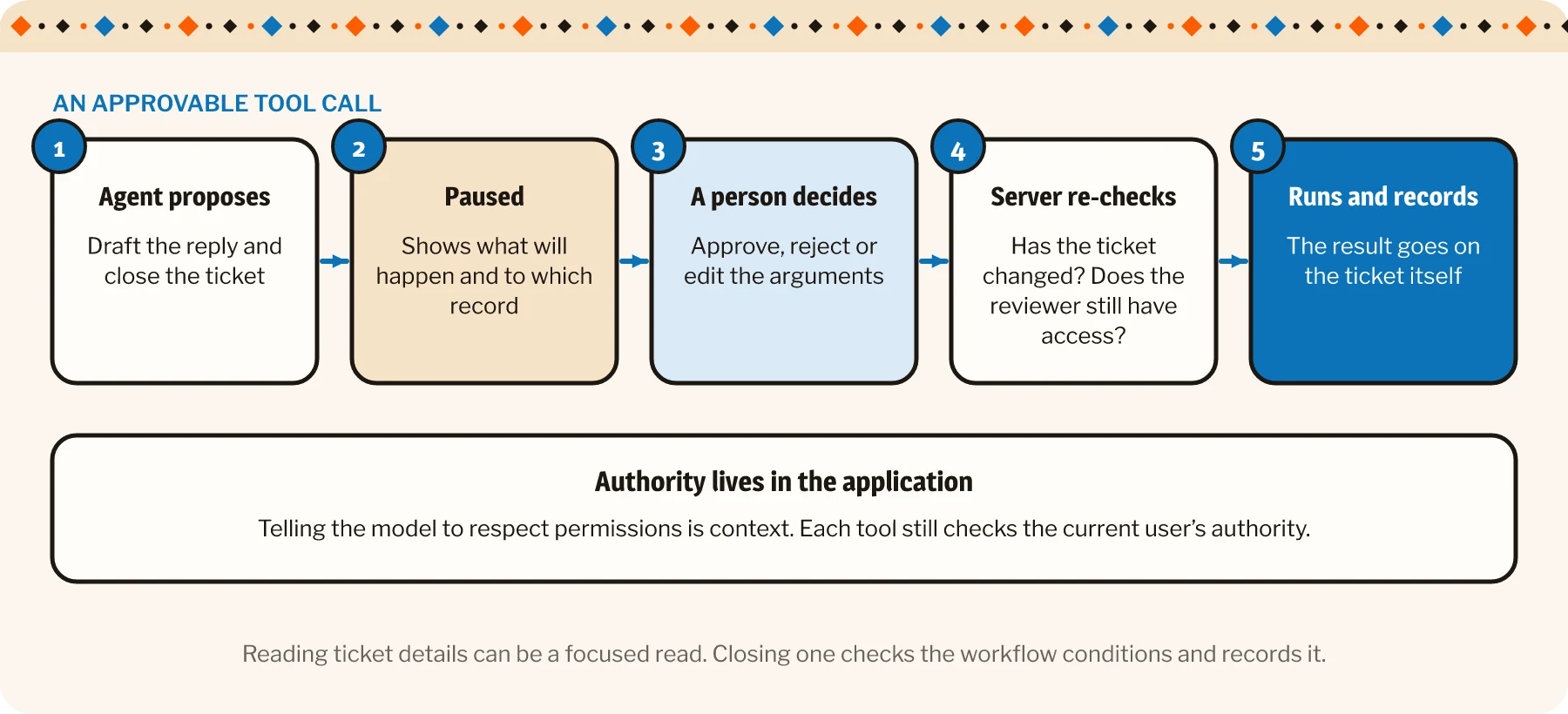
A tool should expose a suitable operation and enforce the current user’s authority to perform it. An instruction telling the model to respect permissions is useful context; authorization belongs in the application.
For the support example, retrieving permitted ticket details can be a focused read operation. Closing a ticket should check the relevant workflow conditions and record the result.
Keep provider differences visible in the integration plan. A shared API does not guarantee that every model supports the same capabilities or makes equivalent decisions. Test the selected provider for the actual function.
Use approval where a person needs to decide
Version 1 introduces an approvable-tool mechanism that can pause a proposed tool call and accept an approval, rejection or edited arguments before continuing.
That creates a useful control point for the support example. Staff could inspect the proposed reply and the decision to close the ticket before the relevant action runs.
The review interface needs to show what will happen and which record it affects. “Approve” is less reassuring when the person has to guess what they are granting permission to do.
We build AI agents with clear jobs and sensible limits. See how.
The server should validate the action again when it executes. A ticket may have changed while the proposal waited, and the original reviewer may no longer have the relevant access.
Treat conversation state as application data
A useful agent workflow may involve several model and tool exchanges. Preserving their relationships helps the application understand what happened and what remains unresolved.
Distinguish a proposal from a completed action
The v1 release changes conversation storage to record individual steps and associate tool results with their calls. That helps retain the structure of the interaction rather than flattening it into disconnected lists.
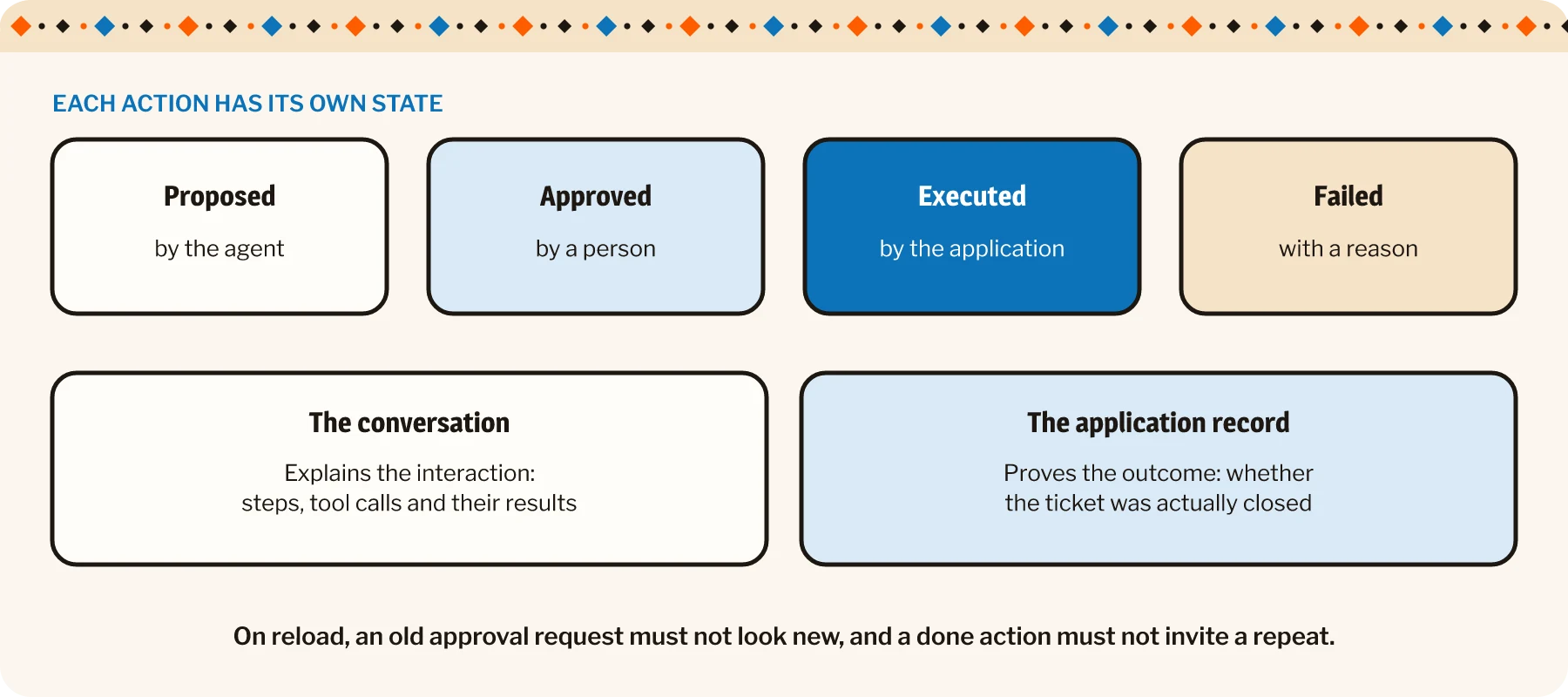
For the business workflow, the important distinction is whether an action was proposed, approved, executed or failed. A message in a conversation is not independent proof that a ticket was closed.
Use authoritative application records to establish the operational result. The conversation can explain the interaction around it.
When the page reloads or a session resumes, the interface should reconstruct the correct state. An old approval request should not look like a new instruction, and a completed action should not invite an accidental repeat.
Plan the migration before deploying the package
The v1 announcement identifies breaking changes, including conversation storage and agent middleware. Its upgrade guide includes a backfill step for existing conversation data.
Check out this blog: Laravel 13 brings AI closer. Keep your business rules close, too.
Review the relevant changes against the application’s current integration. Test migration on an appropriate copy of the data and establish how pending work will be handled before changing the live system.
The middleware behavior also deserves attention because it now wraps generation steps rather than running only once per prompt. Existing logic for context, tools or operational limits needs review under that pattern.
A version number can be small while its luggage is substantial.
| What changed | What to do | |
|---|---|---|
| Conversation storage | Records individual steps and links tool results to their calls | Run the backfill for existing conversations on a copy of the data first |
| Agent middleware | Now wraps each generation step, not once per prompt | Review logic for context, tools and operational limits |
| Pending work | Approvals and conversations in flight during the switch | Decide how they will be handled before changing the live system |
Evaluate the complete workflow after the change
For the support assistant, test a normal draft, an incorrect proposal, a rejected approval and a ticket updated while review is pending. Check authorization, the stored conversation and the actual ticket state.
Include interruptions and provider failures. The person should see a useful status and a safe route to continue, rather than an endlessly thoughtful loading indicator.
| Check | |
|---|---|
| A normal draft | The reply quality and that the workflow reaches the right result |
| An incorrect proposal | That review catches it and nothing runs |
| A rejected approval | The ticket stays as it was and the conversation shows why |
| A ticket updated while review is pending | The server validates again before acting |
| An interruption or provider failure | A useful status and a safe route to continue |
Keep a representative evaluation set so later model or instruction changes can be compared. Assess the quality of the draft as well as whether the workflow reaches the correct result.
I would begin with one bounded feature and expand once its behavior is understood. The SDK can organize the AI integration; the application’s rules and operating process still define the service.
The useful milestone is a feature staff can trust enough to use and understand well enough to correct. V1 is welcome news. It becomes business value when the surrounding workflow knows exactly what to do with it.